

Content Manager Resources
Expand the items below to find information to log into Optimizely for editing, access features and navigate the different views.
To the right, you will find the URLs to the different CMS instances.
Self-Directed Tutorials
Getting Started
 Authorization Form [requires umassmed or umassmemorial login]
- Interface and Functionality
- Creating Content
- Saving Edits
- Managing content/pages
- Managing Media (assets)
- User Guide - Optimizely searchable online guide and tutorials
Here you will find information on creating and editing content
Media Assets (files and images)
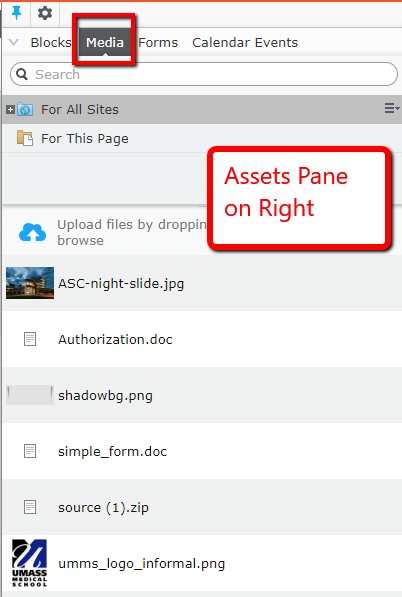 Media assets are images and documents that you can add to your web pages and are stored within the CMS. Assets are available from the assets pane in the CMS, making it easy to drag-and-drop items to upload them to the CMS as well as drag-and-drop them into your content page.
You can work directly with items in the assets pane to create and edit files, images or blocks, or create folders to organize content items. The context menu will provide different options depending on the type of assets selected. How to work with content items in the assets pane is described in the sections:
- Folders - structuring your media and blocks
- Media - searching for, uploading, previewing, etc.
- Blocks - creating, editing, adding to content, etc.
Regarding images, you can edit, crop, set the alignment of images in the image editor when working with images in the WYSIWYG editor.
- See: Adding and editing images in the WYSIWYG area
You can also set other information for images, such as the hero slider information, in the properties view of the image.
Linking to Media
- See: Adding Links to PDFs in content
- See: Adding PDFs to menus
Calendars
Forms
- Creating a Form
- Form elements
- Managing form submissions
- Creating a Basic Form: Create a simple form
- Creating a Multi-Step Form
- Post Processing actions - send email, show a confirmation, or direct users to another page
- Creating a form with form field dependencies

Hero Slider
Please Read: Content Manager Responsibilities
It is the responsibility of the person below to adhere to the University of Massachusetts World Wide Web Guidelines, especially to comply with:
- Page/publication design guidelines and any other University/Campus publishing policies/guidelines/procedures.
- The Americans with Disabilities Act by designing web pages/publications that are accessible to screen reading devices that are used by people with visual impairments.
Browser Compatibility
We recommend using Chrome when editing your web pages. The latest versions of Firefox and Safari are all compatible.
Accessing Optimizely CMS
- The editing interface requires a UmassMed or UMassMemorial account.
- The editing interface can be accessed from anywhere you have an internet connection.
Recent Blog Posts
- Introduction of Geta Categories for CMS Content Tagging
- CMS Forms – send email after form submission
- Clean up empty tags in the WYSIWYG editor
- How to find support for the CMS at UMass Chan
- Finding PDFs that contain accessibility issues in Siteimprove
- Hiding pages from search engines and menus on your site