

 |
Accessing Epic EHR Classroom (EHRC) or Epic (production)To access EHR-C or Epic follow the steps below. |
- UMass Memorial Owned Device: Launch “Remote Access Portal” from ‘UMassMemorialHealthFavorites’ by clicking the star icon in the upper right corner of the browser screen.
From a Personal Device: Click or copy and paste the following link: https://connect.umassmemorial.org - If working remotely you will be prompted to sign in using your UMass Memorial Network Username and Password.
- After entering your network credentials, you will be prompted to complete multifactor authentication via RSA.
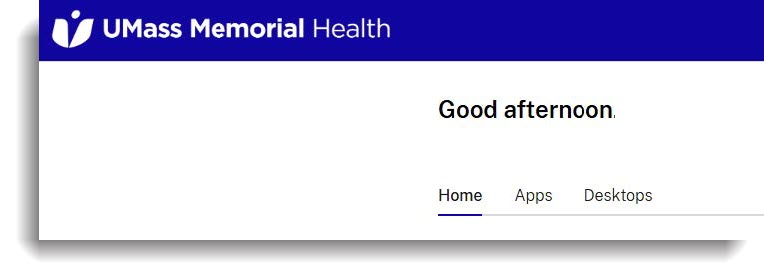
- Once logged in, you will see the Home, Apps and Desktops tabs.
 |
Frequently Asked Questions |
I am a first-year medical/GSN student. I can’t access EHRC because I don’t have a UMass Memorial network account created for me and I haven’t received any emails about it. What should I do to get access?
 UMass Chan IT - Academic Technology together with UMMS IS has automated the process of providing UMMH network accounts with Epic and EHRC access for all learners. Learners will receive their login credentials via email from IS Support Center <umassmemorial@service-now.com>.
If you are currently employed at UMass Memorial or were a previous employee at UMass Memorial at any point, their system automatically skips you during the account creation process. In this case, you will need to reach out to UMass Chan IT Help Desk at (508)-856-8643 or through email (UMassChanHelpdesk@umassmed.edu) to request assistance.
If you have never been employed at UMass Memorial, you can take the following steps:
- Check your personal email for a message from umassmemorial@service-now.com with subject line: “ACTION NEEDED: UMass Memorial Health Login Account Setup for <student name>”
- Call UMass Memorial Health IS Support Center at (508) 334-8800 or email them at umassmemorial@service-now.com to confirm if your account was created.
- If your account was not created, call UMass Chan IT Help Desk at (508) 856-8643 or through email (UMassChanHelpdesk@umassmed.edu) for assistance.
I seem to have lost access to my UMass Memorial network account. What should I do to regain my access?
Please keep in mind, in order to keep your UMass Memorial network account active, you need to log into your account at least once every 60 days.
If you haven’t logged into your account for 60 days, it will be disabled. Once deactivated, you have an additional 30 days to get it reactivated. Should your account become deactivated, contact the UMass Chan IT Help Desk to ask them to submit a request to UMass Memorial IS on your behalf or submit a ticket for ACCOUNT REACTIVATION here.
| Days without Login | Account State | Notes |
| 0 - 60 | Active | Logging into FMD keeps account active; don’t need to open a specific application |
| 60 - 90 | Disabled | Account can be reactivated via Security Access Request (SAR) in IS Self-Service Porta |
I need to reset my password, how do I do that?
Option 1:
Call Clinical IS Support Center at (508) 334-8800, select option #1.
NOTE: For security purposes, Clinical IS requires that you change your password annually.
Option 2:
UMMH Information Services has implemented a self-service password reset tool. This tool allows users to reset their network passwords independently by clicking a button on the login screen and receiving a verification code via personal cell phone, personal email, or corporate cell phone. This more secure process is similar to how you might reset your password on other websites with self-service password reset functionality (i.e., personal banking, credit cards, retailers, etc.)
To use the password reset tool, you must add your personal email and/or personal cell phone number and personal cell phone carrier on the My Information Page of the IS Self-Service Portal in ServiceNow.
I have some issues with my remote access, what shall I do?
For remote access issues, please contact the Clinical IS Support Center at (508) 334-8800.
I have some questions about Epic functionality, what shall I do?
Call Clinical IS Support Center at (508) 334-8800, select option #2. You may also enter a support ticket online via the UMMH IS Self Service.
NOTE: You will need to enter your Clinical user username and password to gain access to the portal.
Can you describe the process of creating UMass Memorial network accounts for incoming students?
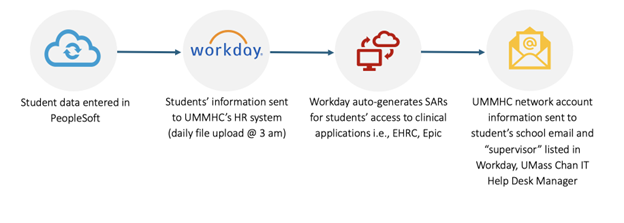
Here is a list of steps involved in creating UMass Memorial network accounts for incoming students.
- UMass Chan students’ information is sent from PeopleSoft to UMass Memorial Health Center (UMMHC) via an automated secure file at 3 am every day.
- UMMHC IS uploads UMass Chan students into Workday, their HR system, as contingent workers reporting to John “Jack” Cleary, Manager for the UMass Chan IT Help Desk.
- Workday autogenerates security access requests (SARs) in the Self-Service Portal to request access to Epic and any other clinical applications as needed.
- UMMHC IS Support Center umassmemorial@service-now.com sends students an email with subject line: ACTION NEEDED: UMass Memorial Health Login Account Setup for <student name> with their network user ID and instructions for setting up their password and the RSA app.
- UMass Chan students’ UMMHC Workday onboarding tasks:
- Review the Confidentiality/User Access Agreement
- Add emergency contacts
- Confirm or update contact and personal information
Note: This process applies to prospective visiting students applying for electives at UMass Chan.
How do I install RSA SECURID® Authenticator?
All UMass Memorial account holders are required to complete pre-hire documents in Workday. To access Workday, you must utilize the UMass Memorial multi-factor authentication tool-RSA Authenticator (SecurID).
Below is a job aid that provides instructions on installing and registering RSA Authenticator (SecurID) on your smartphone.
When should I use the Apps tab versus the Desktops tab?
The Apps tab houses single applications like Epic, Workday, Outlook, Excel, and Word and is great for caregivers who only need a couple of UMass Memorial applications to perform their daily tasks. The Desktop tab is a full virtual Windows environment that looks and behaves like a complete Windows desktop session. This tab is useful for caregivers who need multiple applications or a consistent work environment to perform their daily tasks.
How can I add an application or desktop to the Home tab of the Remote Access portal?
A predetermined list of applications used broadly across UMass Memorial has been added to Home tab as default for all UMass Memorial Health caregivers. You can add or remove applications and desktops to the Home tab by favoriting or unfavoriting:
- Click on the Apps tab.
- Click the
 icon next to the application/desktop you want to show up on your home screen.
Favorited items will automatically appear on the Home tab. Click the star again to remove them from the quick access panel.
Can I change the order of the applications/desktops on the Home tab?
No, the list is alphabetical by the name of the application/desktop by UMass Memorial default for all caregivers. We recommend using favorites and the home tab to achieve a consolidated list of your most used apps and desktops.
How can I find other applications and desktops that do not display on the Home page?
Use the search bar at the top of the portal to enter the name of the application you are looking for.
I cannot find an application that I used in FMD in the new remote access portal. What should I do?
Before May 4 when FMD is no longer accessible, please submit a ticket via the IS Self-Service Portal to evaluate the application to be added to the new remote access portal.
My Home tab layout is different – the apps are in a list vs. horizontal tiles. What happened, and how do I address this?
Depending on the resolution of your monitor, zooming in or zooming out may cause the display of the Home tab to change. You can either change the resolution on your monitor or zoom in/zoom out.
How long does my remote session stay active?
Applications and desktops are monitored for activity. When the session reaches 15 minutes of inactivity, it will be disconnected. Once the session is disconnected, the session will remain active for 18 hours before being completely closed down; this allows you to reconnect to an application or desktop and continue working where you left off.
My remote access session is slow. How can I improve performance?
Close unused browser tabs, restart your device, validate your Wi-Fi connection is strong, disconnect unused monitors, and if you are on a personal device, update the Citrix Workspace to a later version.